
7-CHANNEL EXTENSION MODULE
Has 7 outputs for connecting loads and 12 inputs for connecting various sensors/buttons.
Features
- 7 universal outputs support:
- Lights
- NC/NO heating valves
- Blinds
- 1 or 2-pole gates
- 1 or 2-pole valves
- NC/NO locks
- Fan coil units
- 12 Discreet inputs that support:
- Buttons
- Switches
- Reed switches
- Leak sensors
- Motion detectors
- 4 digital inputs for up to 8 temperature sensors
CAUTION! All work related to the installation, connection, setting up, service and support must be carried out by qualified personnel with sufficient skills and experience in working with electrical equipment. To avoid the risk of fire, electric shock, damage to the system and/or personal injury, the system installation and assembly must be performed in accordance with the instructions listed below:
- all connectivity work must be carried out with the power turned OFF;
- use appropriate tools and personal protection against electric shock;
- do not use damaged cables, wires and connectors;
- avoid folding the cables and wires;
- do not apply excessive force to the wires by kinking or pressing them too hard: the inner conductors of the cables and wires may get stripped or damaged;
- do not use the power socket with poor contacts to connect;
- do not exceed the load limit parameters specified in the manual;
- the supply conductors wire section is subject to the specifications for current density limit, insulation type and wire material. Light section can result in cable overheating and fire.
When the power is on, NEVER:
- connect/disconnect the connectors;
- open modules and sensors.
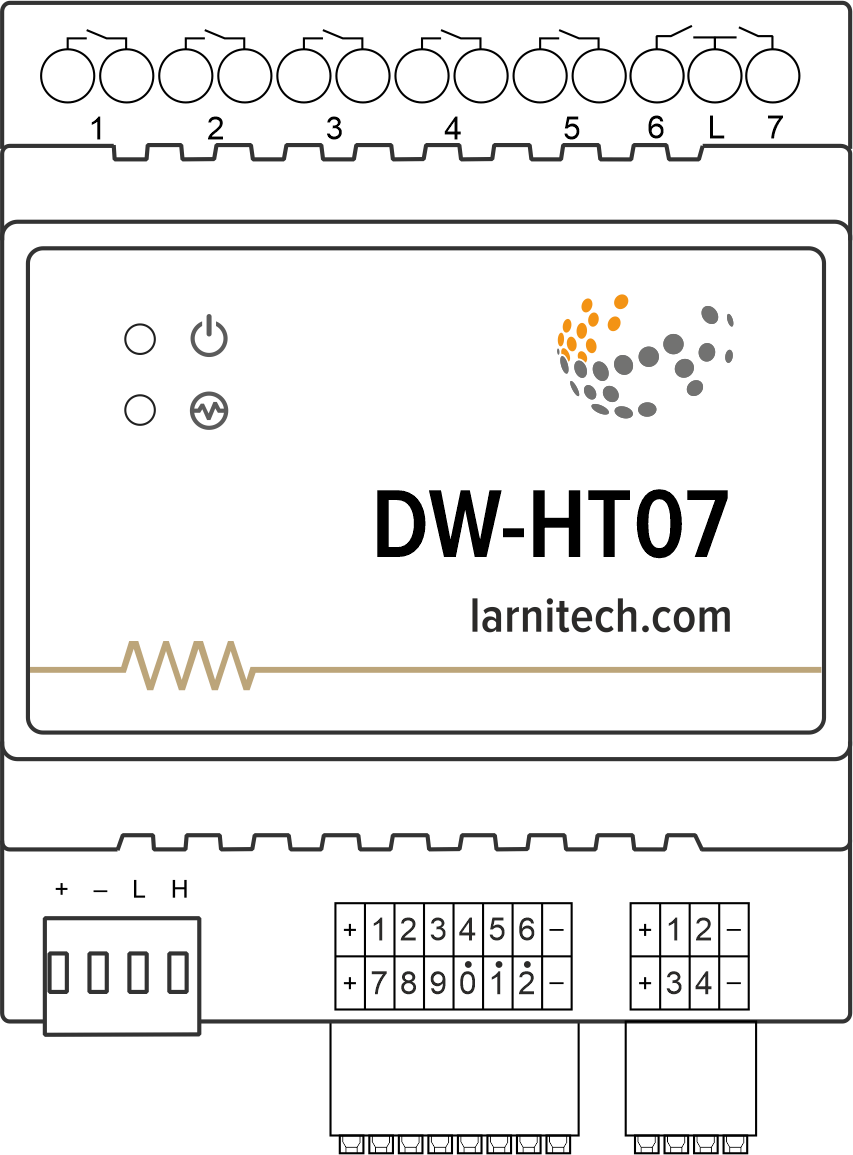
Overview
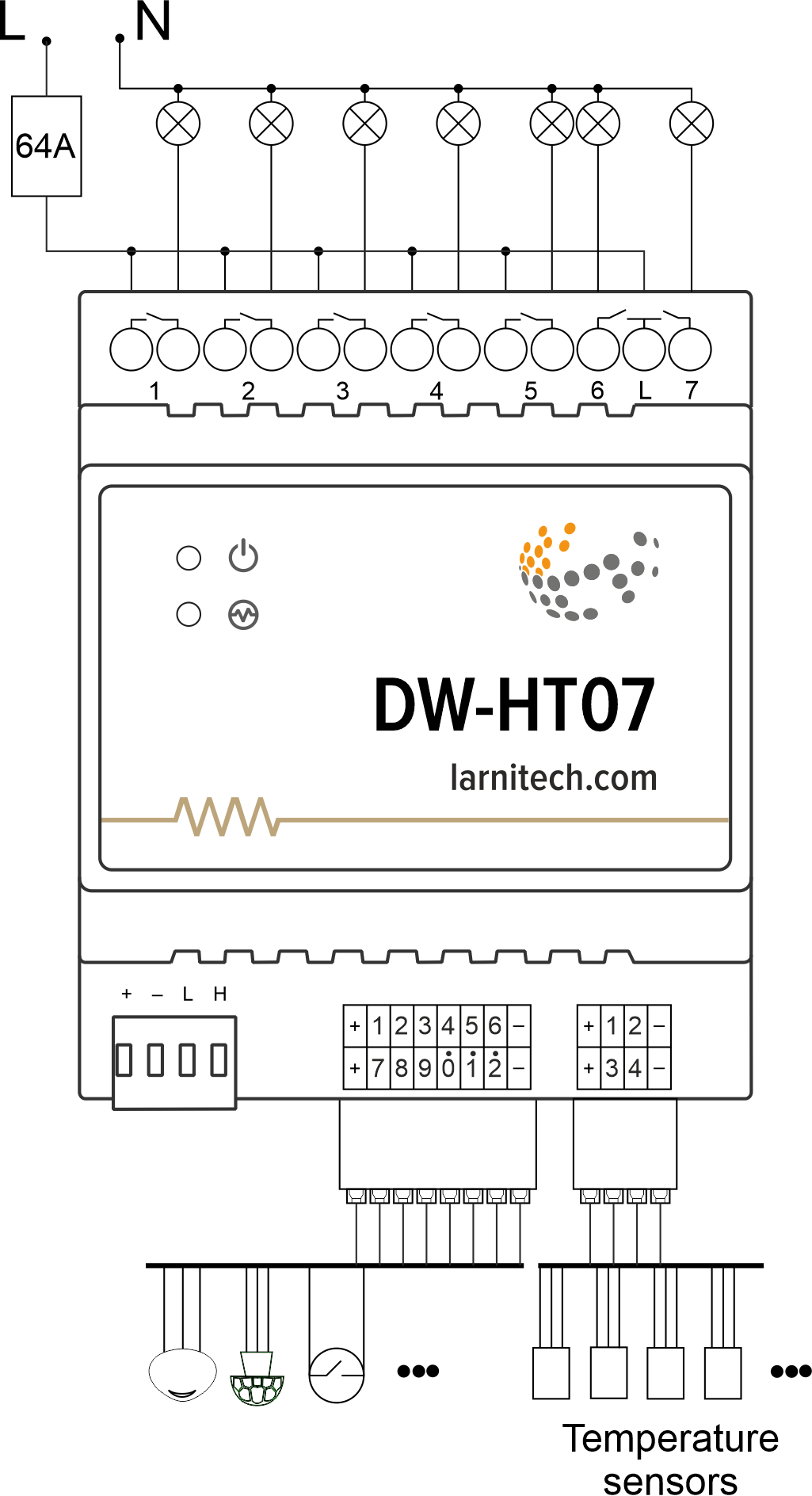
Example of connection
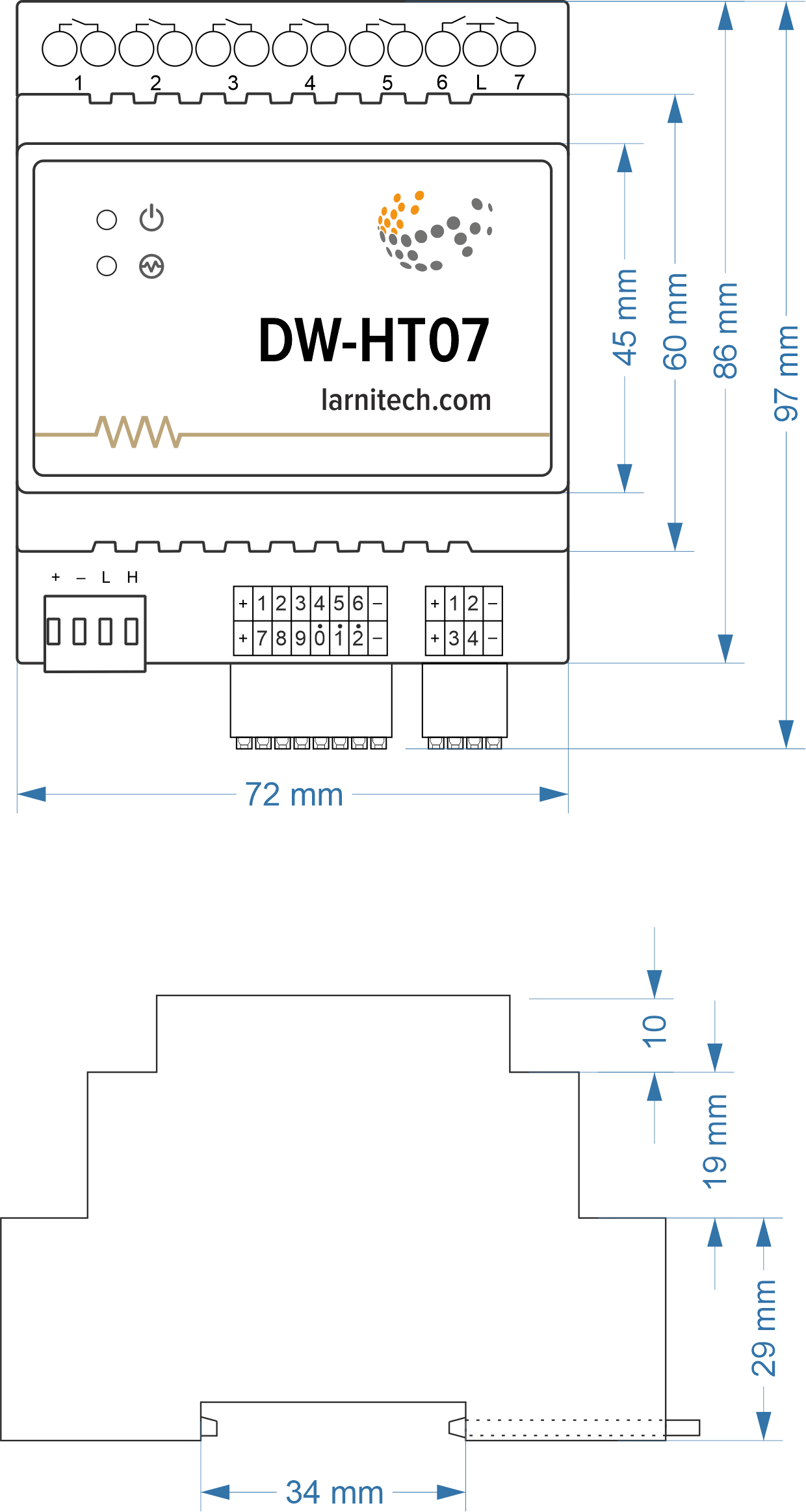
Module dimensions
Module parameters
| Parameter name | Value |
|---|---|
| Output channels qty | 7 |
| Digital line maximum length | 30 m |
| Discrete input channels qty | 12 |
| Digital input channels qty | 4 |
| Input voltage | 0-250V |
| Current type | AC/DC |
| Max load per channel | 16A |
| Power supply | 20.0 … 27.5 V DC from CAN |
| Max current(24V) | 140 mA |
| Bus type | CAN |
| Equipment installation type | DIN rail (EN 60715) |
| Case material | ABS |
| Protection | IP40 |
| Temperature range | -10 … +50 °C |
| Size | 4U, 69x115x58 mm |
| Weight | 255 g |
Connectivity recommendations
In order to protect the actuator and loads connected to it, installing a circuit breaker is recommended. The nominal value of the circuit breaker should be calculated based on the maximum total load of connected devices and at the same time should not significantly exceed the maximum permissible characteristics of the actuator. Depending on the requirements, you can use one circuit breaker for one actuator (it is recommended) or one circuit breaker per each group of connected loads, or, if necessary, a separate circuit breaker can be installed for each load.
Connection of actuators
Caution: Before applying power to the module, you must properly configure the outputs in the application. The contacts configured incorrectly can lead to simultaneous power supply to both channels, resulting in the module failure and/or failure of the equipment connected to it, and even a fire. If free (unused) channels remain in a given group after a curtain/jalousie/shutter actuator with low-voltage control or gate actuator has been connected to it, these channels need to be left unused. (Do not connect other devices to them!)Connection of the lights/electric contactor/heating thermal actuator
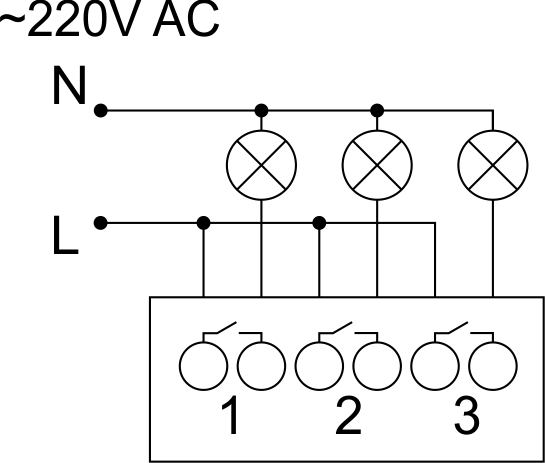
Sample HW for this configuration
1hw="out='LLL----'"
Connection of high load device
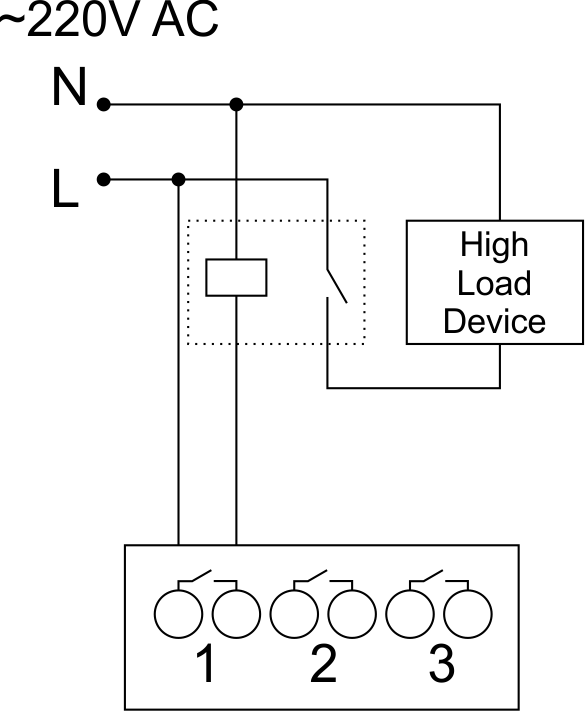
|
Recomended contactors:
|
Connection of curtain/jalousie/shutter actuator with 220V force control
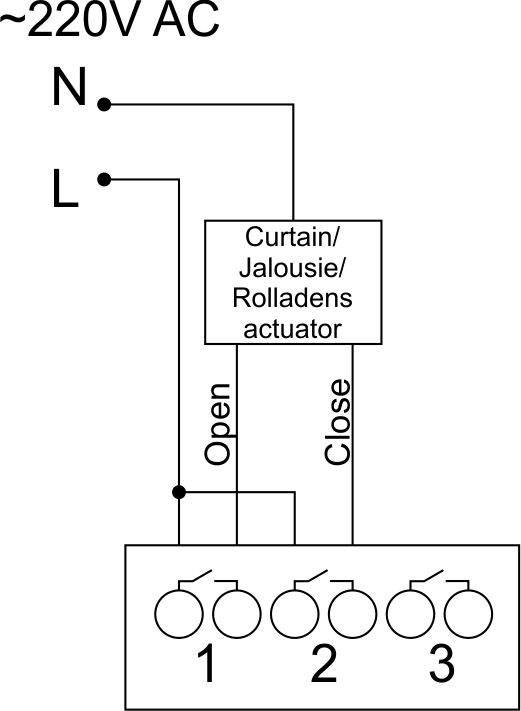
Sample HW for this configuration
1hw="out='B------'"
Connection of curtain/jalousie/shutter actuator with low-voltage control
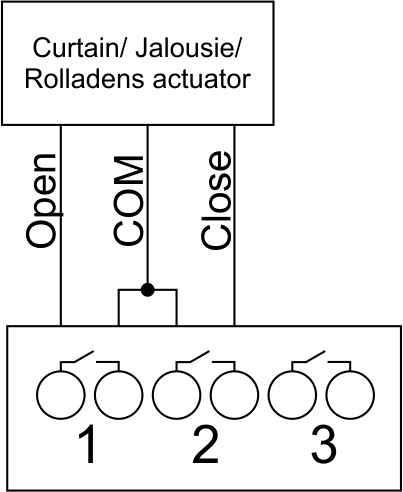
Sample HW for this configuration
1hw="out='B------'"
Connection of single-pole gate actuator
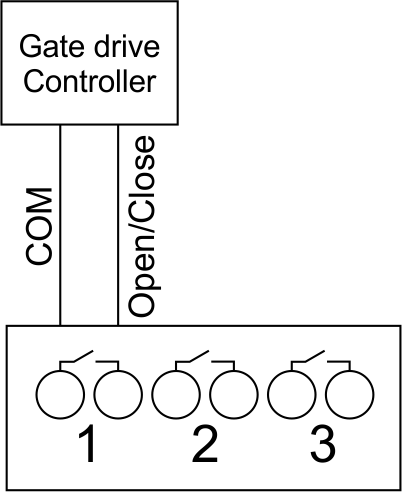
Sample HW for this configuration
1hw="out='X------'"
Connection of double-pole gate actuator
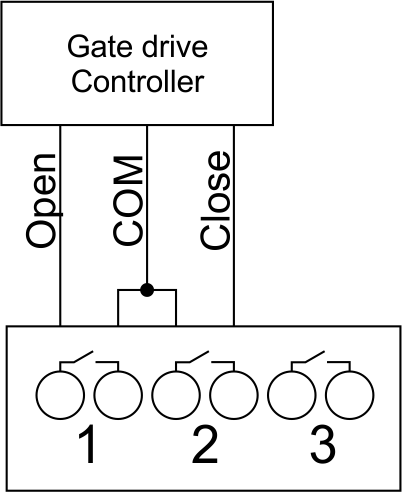
Sample HW for this configuration
1hw="out='G------'"
Connection of single-pole water/gas supply valve
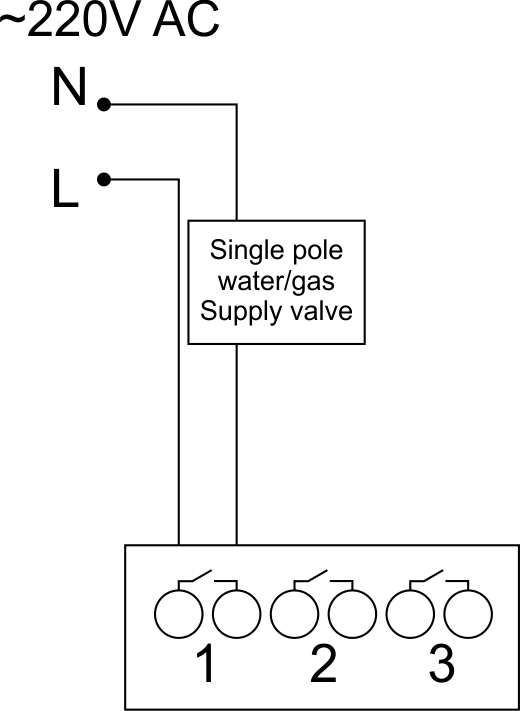
Sample HW for this configuration
1hw="out='R------'"
Connection of double-pole water/gas supply valve
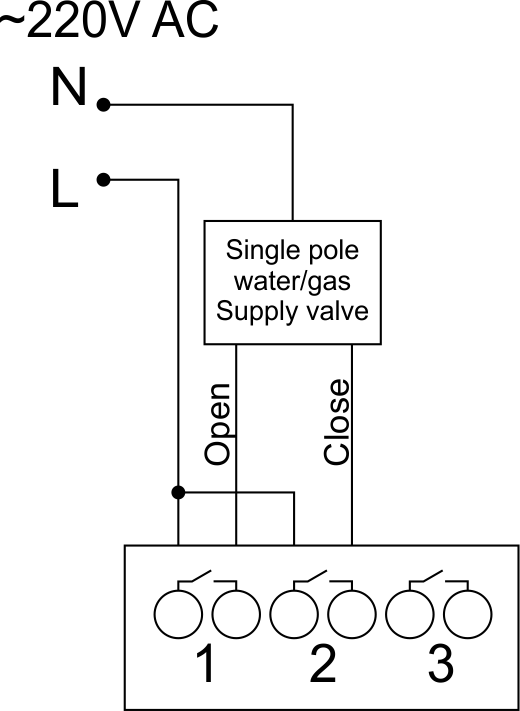
Sample HW for this configuration
1hw="out='V------'"
Connection of fancoil control unit
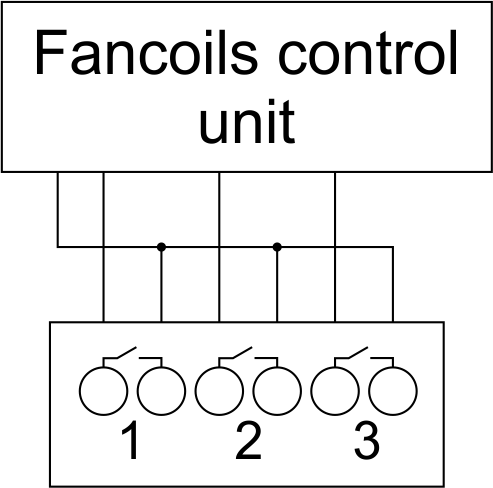
Sample HW for this configuration
1hw="out='FFF----'"
Example of sensors connection
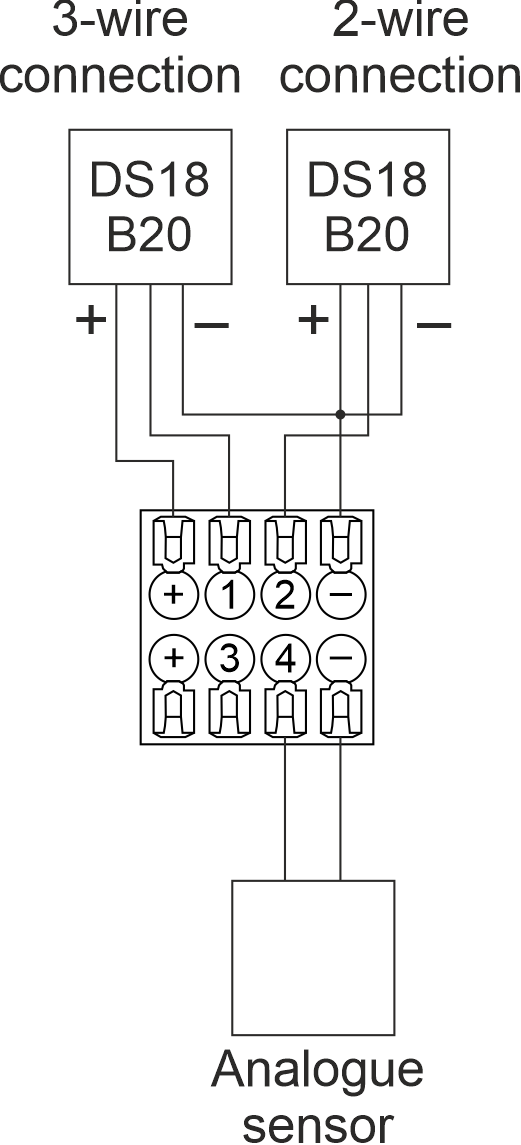
2-wire connection recommended
Indication of module operation
Bootloader
| Indicator | Status | Description |
|---|---|---|
 |

|
Device in bootloader |
 |

|
Downloading firmware |

|
Flashing firmware |
Firmware mode
| Indicator | Status | Description |
|---|---|---|
|
|
||
|
Identification | |
|
|
Operational mode | |
|
Error |
||
|
|
Lost connection to server | |
|
|
Overheat |
Module installation and connection procedure
- Connect the outputs.
- Connect the inputs.
- Connect the Can connector.
- Configure the module using LT setup.
- Apply power to the load
- Check all equipment for proper operation.
Module shut-off and deinstallation procedure
- Disconnect the power from the load
- Disconnect the CAN connector.
- Disconnect the inputs.
- Disconnect the outputs.
HW Settings
| Name | Type, range | SUBID | Default | Description |
|---|---|---|---|---|
| runtime | integer 0-100 | 1-7 | 15 | runtime is the open/close time in seconds, is used for jalousie, gate, valve(2 pole); Example: runtime=15 |
| runtimeopen | integer 0-60000 | Blinds subId | - | Runtimeopen is the open time in milliseconds, is used for blinds; Example: runtimeopen=15000 |
| runtimeclose | integer 0-60000 | Blinds subId | - | Runtimeclose is the close time in milliseconds, is used for blinds; Example: runtimeclose=15000 |
| hold | integer 0-10000 | 1-7 | 500 | hold is the bridging time in miliseconds, is used for gate and jalousie (by default hold is the same as runtime), lock; Example: hold=3500 |
| def | string 'ON' | 1-7 | 'OFF' | def is the element status is set after restart, is used for lamp, heating, valve(1 pole); Example: def='ON' |
| stop | Char ‘R’ | 1-7 | – | (for 2-pole gate and blinds) If it is declared then by Stop command during the motion, the same impulse appears as it was at the beginning of the motion. Pole, an which the stop-impules is formed, is defined by the parameter Stop value. If it is ‘r’ or ‘R’ then stop-impulse is produced on the opposite to the start-impulse pole. If any other value is delcared (e.g., ‘d’ ) then the stop-impulse is on the same pole. If a Runtime passed after the beginning of the motion then the stop-impulse is not formed. Example: stop=’r’ |
| out | char[7] | 98 | 'LLLLLLL' |
Each char is responsible for the type of a particular channel
Example: out='LLHHHG-' |
| offset | float | SubID of OW temperature sensors | '0' |
[+/- 0..39] – sensor values offset;
For example, offset is -3.8 : hw="offset='-3.8'" |
| in | char[12] | 98 | 'KKKKKKKKKKKK' |
Each char is responsible for the type of a particular channel
Example: in='KKKBBBLLLMMM' |
 1<item addr="479:1" auto-period="600" cfgid="42" name="Lamp" type="lamp" uniq_id="145" hw="def='ON'"/>
 2<item addr="479:2" cfgid="42" name="Radiator" type="valve-heating" uniq_id="146" hw="def='ON'">
 3  <automation name="Eco" temperature-level="16" uniq_id="147"/>
 4  <automation name="Comfort" temperature-level="22" uniq_id="148"/>
 5  <automation name="Hot" temperature-level="25" uniq_id="149"/>
 6</item>
 7<item addr="479:3" cfgid="42" name="Gate" sub-type="120" type="gate" uniq_id="150" hw="runtime=25"/>
 8<item addr="479:5" cfgid="42" name="Jalousie" sub-type="120" type="jalousie" uniq_id="151" hw="runtime=50"/>
 9<item addr="479:7" cfgid="42" name="Valve" type="valve" uniq_id="152" hw="def='ON'"/>
10<item addr="479:11" cfgid="42" name="Switch" type="switch" uniq_id="153"/>
11<item addr="479:12" cfgid="42" name="Switch" type="switch" uniq_id="154"/>
12<item addr="479:13" cfgid="42" name="Door" type="door-sensor" uniq_id="133"/>
13<item addr="479:14" cfgid="42" name="Door" type="door-sensor" uniq_id="134"/>
14<item addr="479:15" cfgid="42" name="Leak" type="leak-sensor" uniq_id="155"/>
15<item addr="479:16" cfgid="42" name="Leak" type="leak-sensor" uniq_id="156"/>
16<item addr="479:17" cfgid="42" name="Motion" type="motion-sensor" uniq_id="157"/>
17<item addr="479:18" cfgid="42" name="Door" type="door-sensor" uniq_id="138"/>
18<item addr="479:20" cfgid="42" name="Door" type="door-sensor" uniq_id="140"/>
19<item addr="479:21" cfgid="42" name="Motion" type="motion-sensor" uniq_id="158"/>
20<item addr="479:97" cfgid="42" name="Temperature" system="yes" type="temperature-sensor" uniq_id="143"/>
21<item addr="479:98" cfgid="42" hw="out='LHG-B-R' in='CSKHLNMK-KM-'" name="Temperature" system="yes" type="temperature-sensor" uniq_id="144"/>
Чтобы приобрести понравившийся товар, необходимо его заказать. Есть несколько сценариев того, как это можно сделать.
- Выбрать понравившийся товар и нажать кнопку «Заказать». При оформлении заказа заполнить форму. Вписать информацию в поля: ФИО, телефон и e-mail. Затем вам перезвонит менеджер, чтобы подтвердить ваше согласие на совершение покупки.
- Выбрать понравившийся товар и нажать кнопку «В корзину». Затем перейти в корзину и нажать «Оформить заказ». Далее заполнить форму с контактными данными и отправить заявку. С вами свяжется менеджер для дальнейшего обсуждения.
- Перейти в карточку товара и нажать «Купить в один клик». После нажатия нужно заполнить форму и отправить заявку. С вами свяжется менеджер для дальнейшего обсуждения.
Мы работаем с физическими и юридическими лицами. И предоставляем сразу два варианта оплаты.
- Наличные. Вы подписываете товаросопроводительные документы, расплачиваетесь денежными средствами, получаете товар и чек.
- Безналичный расчет. Принимаем карты Visa и MasterCard. Доступен при курьерской доставке.
Ваш заказ можем доставить собственными ресурсами, при условии вашего нахождения в городе. Либо через 4 варианта доставки:
- Курьерская доставка. Курьерская доставка работает с 9:00 до 19:00. Когда товар поступит на склад, курьерская служба свяжется для уточнения деталей. Специалист предложит выбрать удобное время доставки и уточнит адрес.
- Самовывоз из магазина. Для получения заказа обратитесь к сотруднику в кассовой зоне и назовите номер.
- Сотрудничаем с постаматами. Срок хранения — 3 дня.
- Предоставляем почтовую доставку через почту России. Когда заказ придет в отделение, на ваш адрес придет извещение о посылке. Вскрывать коробку самостоятельно вы можете только после оплаты заказа.
Для корректного подбора оборудования обращайтесь к нашим менеждерам для получения консультации. Мы с радостью обсудим с вами ваш проект и подберем оптимальную конфигурацию.
Наши специалисты могут выехать на ваш объек, чтобы проконсультировать на месте.
123