
7-CHANNEL EXTENSION MODULE
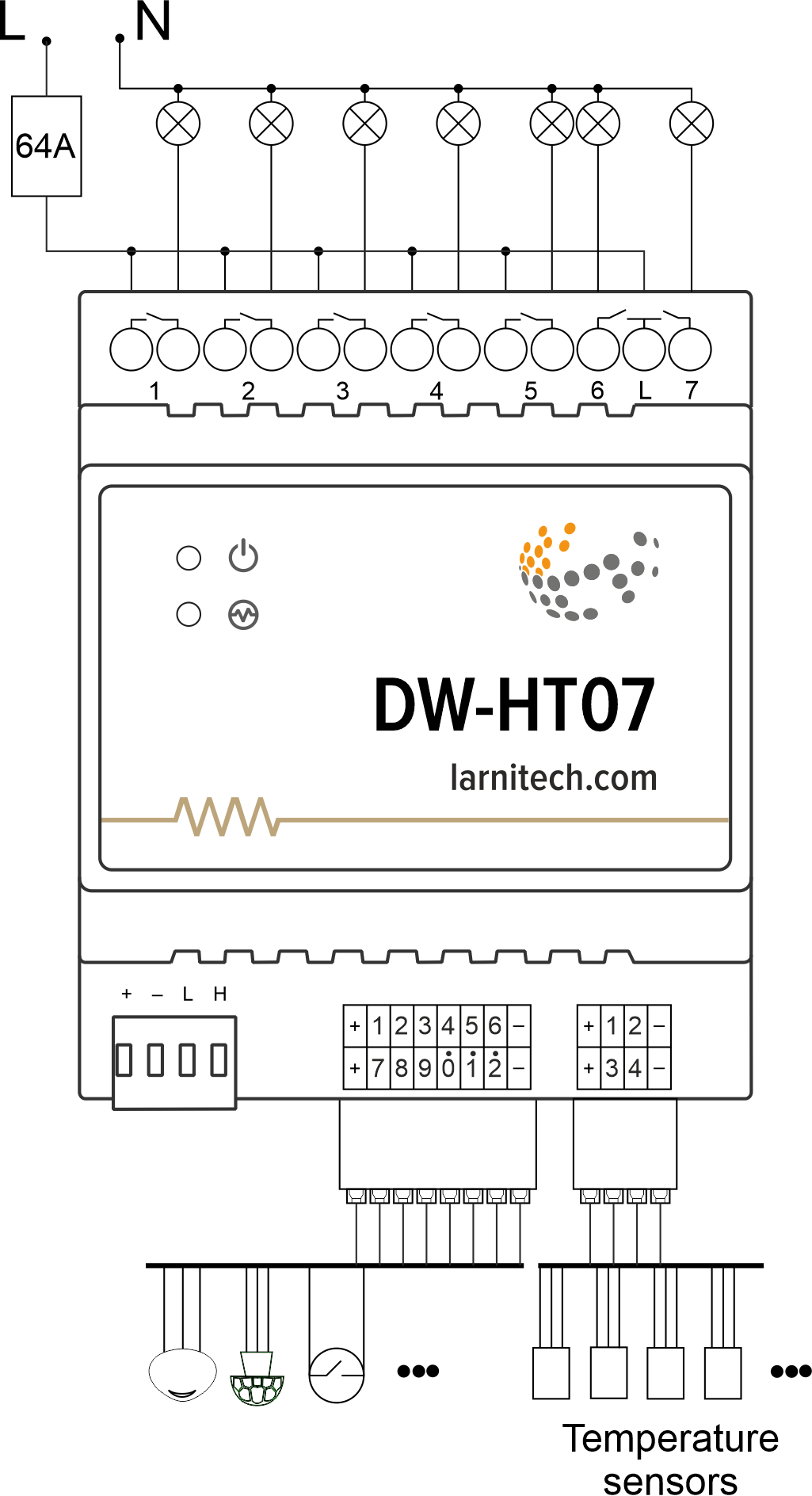
Has 7 outputs for connecting loads and 12 inputs for connecting various sensors/buttons.
Features
- 7 universal outputs support:
- Lights
- NC/NO heating valves
- Blinds
- 1 or 2-pole gates
- 1 or 2-pole valves
- NC/NO locks
- Fan coil units
- 12 Discreet inputs that support:
- Buttons
- Switches
- Reed switches
- Leak sensors
- Motion detectors
- 4 digital inputs for up to 8 temperature sensors
CAUTION! All work related to the installation, connection, setting up, service and support must be carried out by qualified personnel with sufficient skills and experience in working with electrical equipment. To avoid the risk of fire, electric shock, damage to the system and/or personal injury, the system installation and assembly must be performed in accordance with the instructions listed below:
- all connectivity work must be carried out with the power turned OFF;
- use appropriate tools and personal protection against electric shock;
- do not use damaged cables, wires and connectors;
- avoid folding the cables and wires;
- do not apply excessive force to the wires by kinking or pressing them too hard: the inner conductors of the cables and wires may get stripped or damaged;
- do not use the power socket with poor contacts to connect;
- do not exceed the load limit parameters specified in the manual;
- the supply conductors wire section is subject to the specifications for current density limit, insulation type and wire material. Light section can result in cable overheating and fire.
When the power is on, NEVER:
- connect/disconnect the connectors;
- open modules and sensors.
Overview
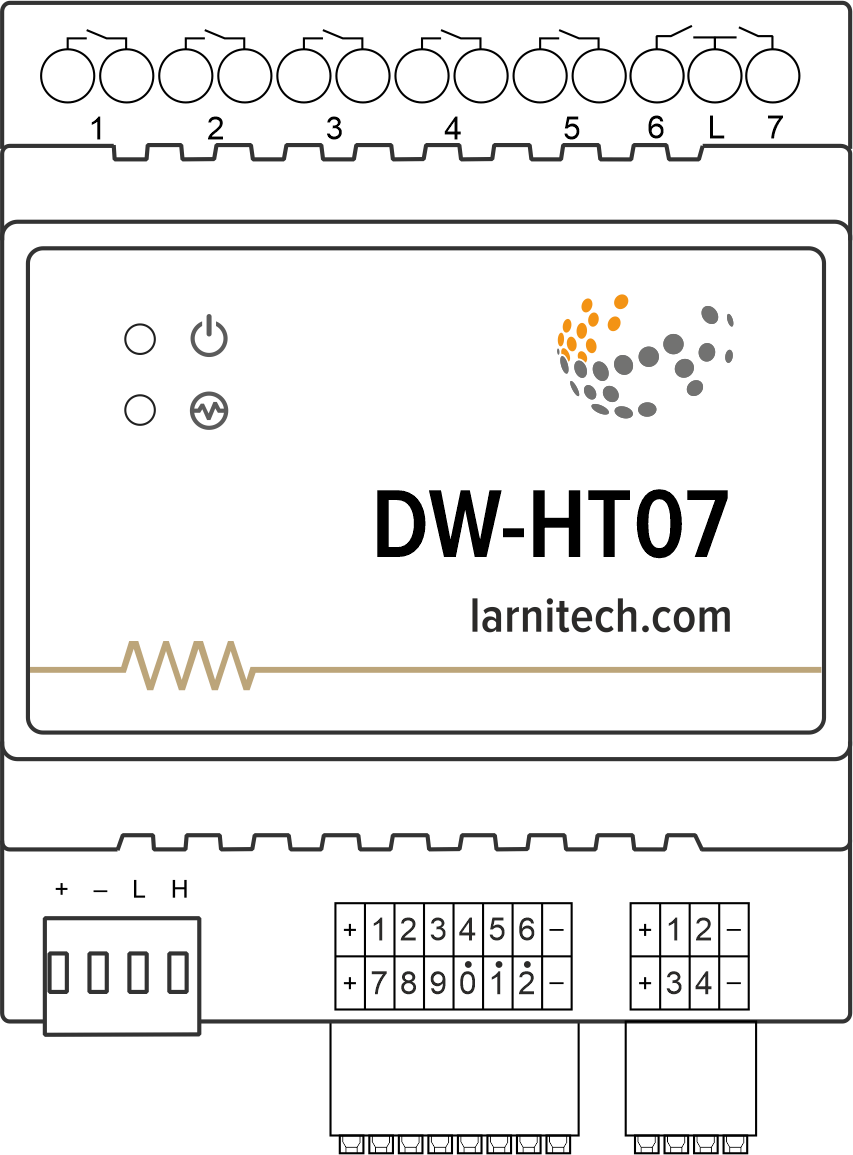
Example of connection
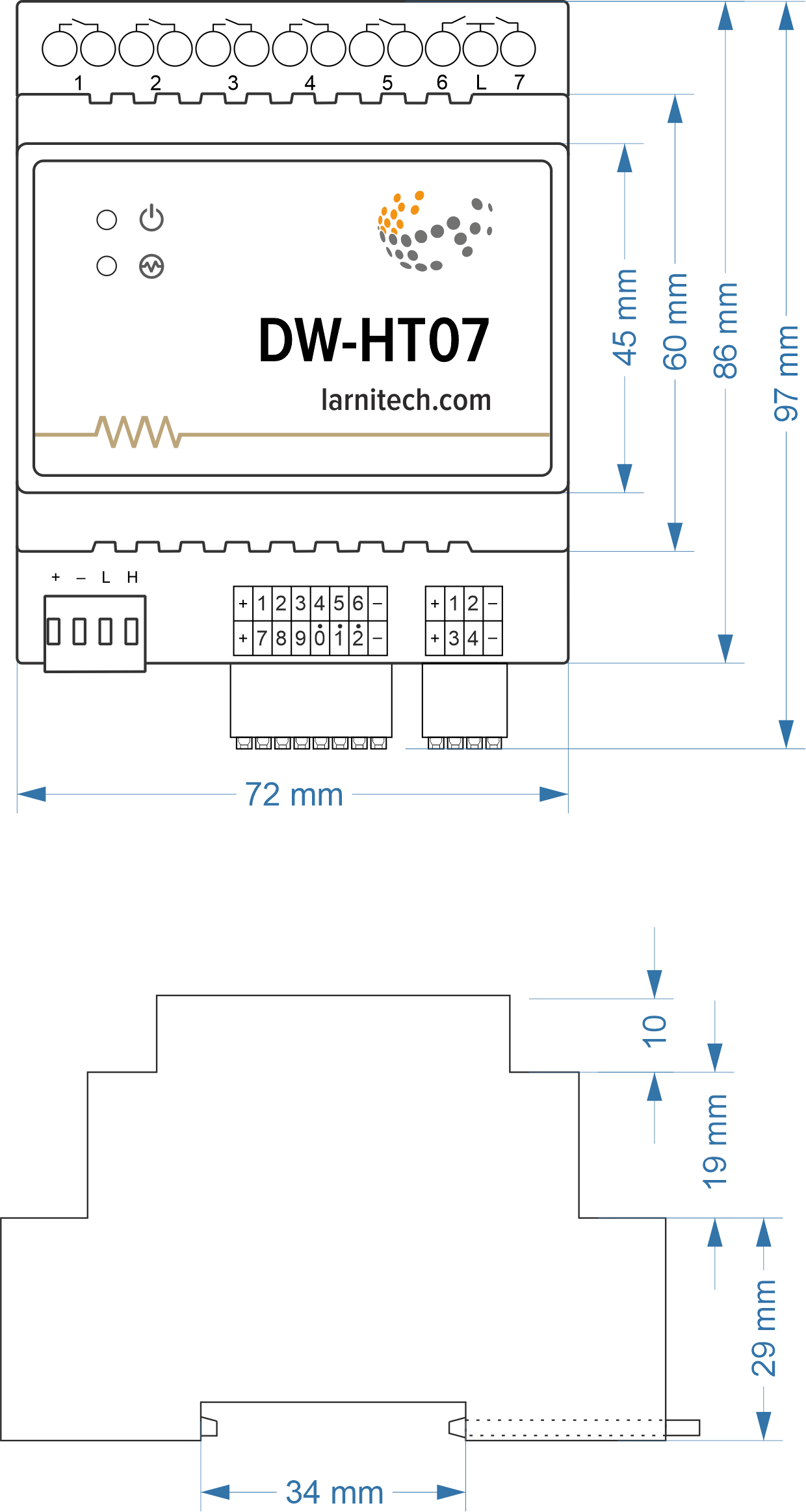
Module dimensions
Module parameters
| Parameter name | Value |
|---|---|
| Output channels qty | 7 |
| Digital line maximum length | 30 m |
| Discrete input channels qty | 12 |
| Digital input channels qty | 4 |
| Input voltage | 0-250V |
| Current type | AC/DC |
| Max load per channel | 16A |
| Power supply | 20.0 … 27.5 V DC from CAN |
| Max current(24V) | 140 mA |
| Bus type | CAN |
| Equipment installation type | DIN rail (EN 60715) |
| Case material | ABS |
| Protection | IP40 |
| Temperature range | -10 … +50 °C |
| Size | 4U, 69x115x58 mm |
| Weight | 255 g |
Connectivity recommendations
In order to protect the actuator and loads connected to it, installing a circuit breaker is recommended. The nominal value of the circuit breaker should be calculated based on the maximum total load of connected devices and at the same time should not significantly exceed the maximum permissible characteristics of the actuator. Depending on the requirements, you can use one circuit breaker for one actuator (it is recommended) or one circuit breaker per each group of connected loads, or, if necessary, a separate circuit breaker can be installed for each load.
Connection of actuators
Caution: Before applying power to the module, you must properly configure the outputs in the application. The contacts configured incorrectly can lead to simultaneous power supply to both channels, resulting in the module failure and/or failure of the equipment connected to it, and even a fire. If free (unused) channels remain in a given group after a curtain/jalousie/shutter actuator with low-voltage control or gate actuator has been connected to it, these channels need to be left unused. (Do not connect other devices to them!)Connection of the lights/electric contactor/heating thermal actuator
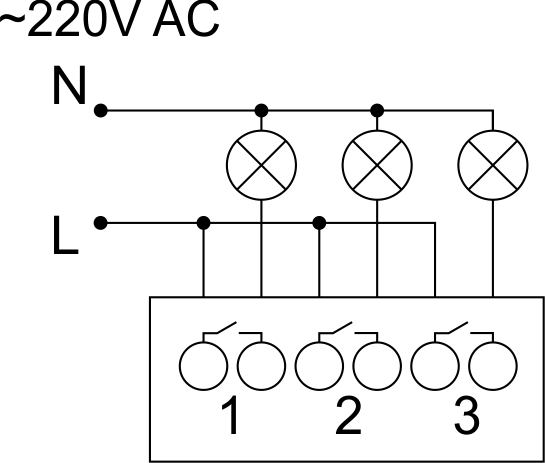
Sample HW for this configuration
1hw="out='LLL----'"
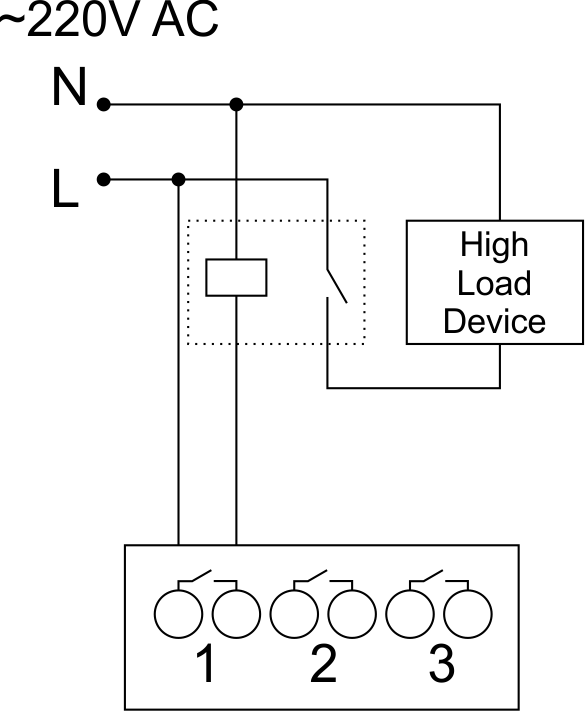
Connection of high load device
|
Recomended contactors:
|
Connection of curtain/jalousie/shutter actuator with 220V force control
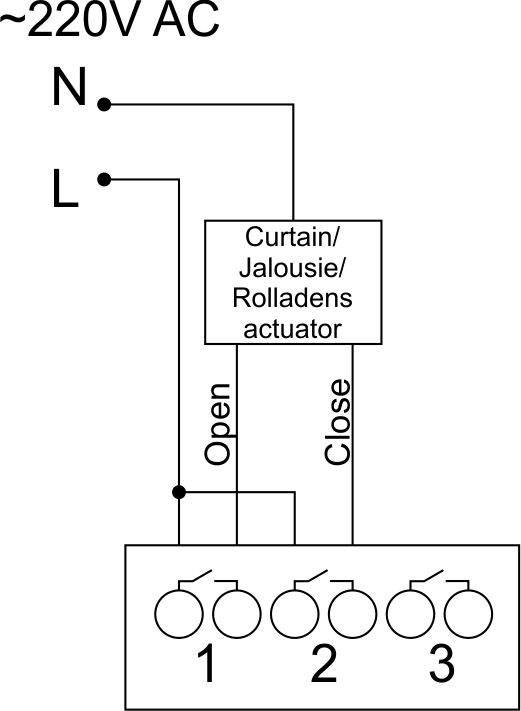
Sample HW for this configuration
1hw="out='B------'"
Connection of curtain/jalousie/shutter actuator with low-voltage control
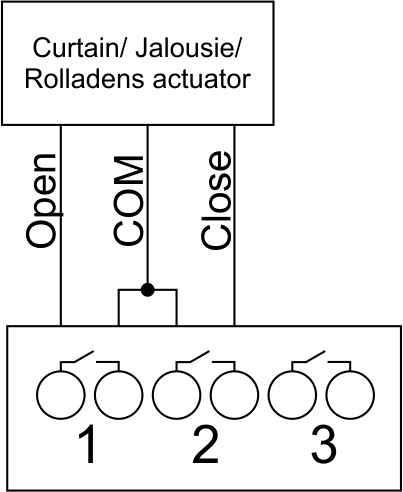
Sample HW for this configuration
1hw="out='B------'"
Connection of single-pole gate actuator
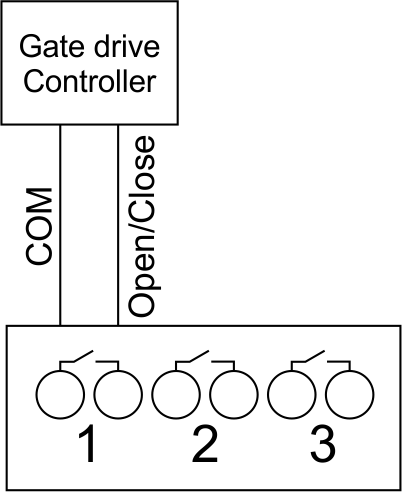
Sample HW for this configuration
1hw="out='X------'"
Connection of double-pole gate actuator
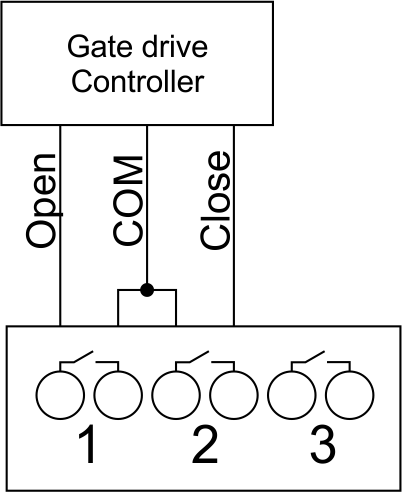
Sample HW for this configuration
1hw="out='G------'"
Connection of single-pole water/gas supply valve
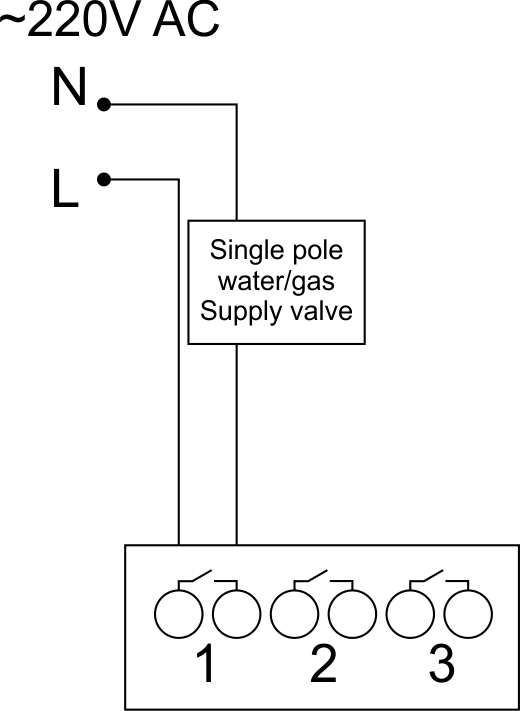
Sample HW for this configuration
1hw="out='R------'"
Connection of double-pole water/gas supply valve
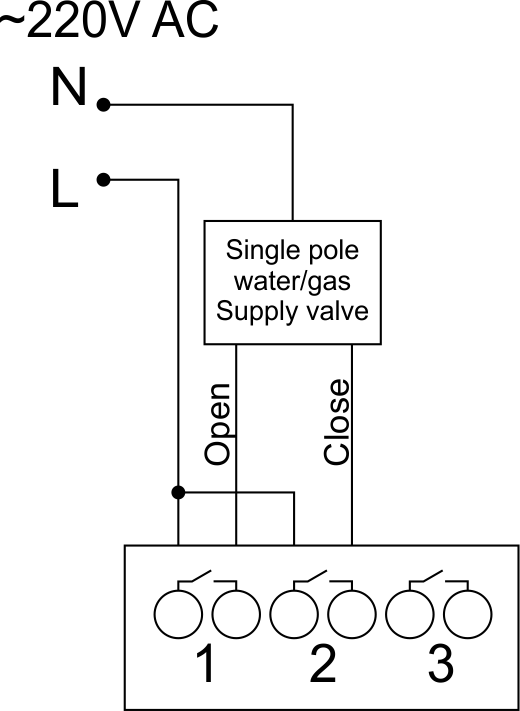
Sample HW for this configuration
1hw="out='V------'"
Connection of fancoil control unit
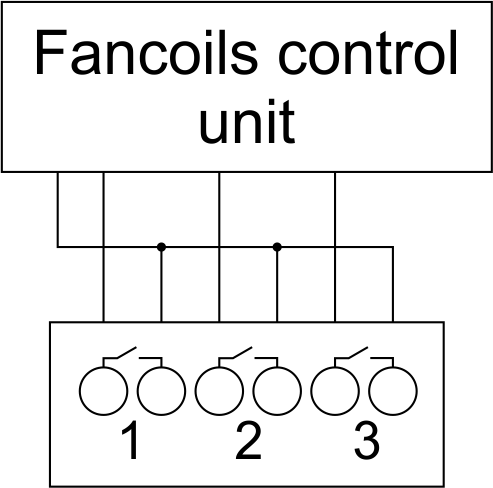
Sample HW for this configuration
1hw="out='FFF----'"
Example of sensors connection
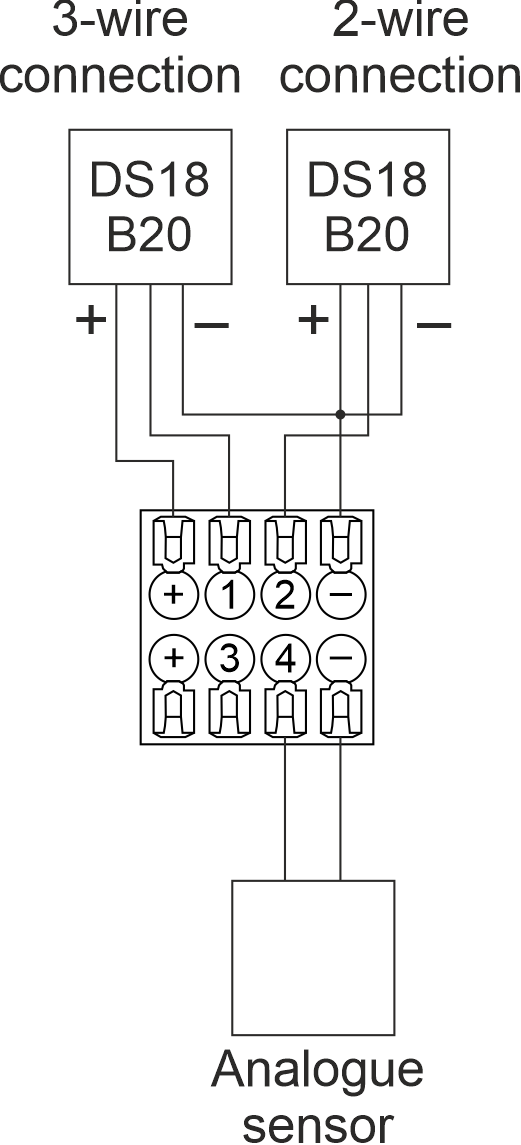
2-wire connection recommended
Indication of module operation
Bootloader
| Indicator | Status | Description |
|---|---|---|
 |

|
Device in bootloader |
 |

|
Downloading firmware |

|
Flashing firmware |
Firmware mode
| Indicator | Status | Description |
|---|---|---|
|
|
||
|
Identification | |
|
|
Operational mode | |
|
Error |
||
|
|
Lost connection to server | |
|
|
Overheat |
Module installation and connection procedure
- Connect the outputs.
- Connect the inputs.
- Connect the Can connector.
- Configure the module using LT setup.
- Apply power to the load
- Check all equipment for proper operation.
Module shut-off and deinstallation procedure
- Disconnect the power from the load
- Disconnect the CAN connector.
- Disconnect the inputs.
- Disconnect the outputs.
HW Settings
| Name | Type, range | SUBID | Default | Description |
|---|---|---|---|---|
| runtime | integer 0-100 | 1-7 | 15 | runtime is the open/close time in seconds, is used for jalousie, gate, valve(2 pole); Example: runtime=15 |
| runtimeopen | integer 0-60000 | Blinds subId | - | Runtimeopen is the open time in milliseconds, is used for blinds; Example: runtimeopen=15000 |
| runtimeclose | integer 0-60000 | Blinds subId | - | Runtimeclose is the close time in milliseconds, is used for blinds; Example: runtimeclose=15000 |
| hold | integer 0-10000 | 1-7 | 500 | hold is the bridging time in miliseconds, is used for gate and jalousie (by default hold is the same as runtime), lock; Example: hold=3500 |
| def | string 'ON' | 1-7 | 'OFF' | def is the element status is set after restart, is used for lamp, heating, valve(1 pole); Example: def='ON' |
| stop | Char ‘R’ | 1-7 | – | (for 2-pole gate and blinds) If it is declared then by Stop command during the motion, the same impulse appears as it was at the beginning of the motion. Pole, an which the stop-impules is formed, is defined by the parameter Stop value. If it is ‘r’ or ‘R’ then stop-impulse is produced on the opposite to the start-impulse pole. If any other value is delcared (e.g., ‘d’ ) then the stop-impulse is on the same pole. If a Runtime passed after the beginning of the motion then the stop-impulse is not formed. Example: stop=’r’ |
| out | char[7] | 98 | 'LLLLLLL' |
Each char is responsible for the type of a particular channel
Example: out='LLHHHG-' |
| offset | float | SubID of OW temperature sensors | '0' |
[+/- 0..39] – sensor values offset;
For example, offset is -3.8 : hw="offset='-3.8'" |
| in | char[12] | 98 | 'KKKKKKKKKKKK' |
Each char is responsible for the type of a particular channel
Example: in='KKKBBBLLLMMM' |
 1<item addr="479:1" auto-period="600" cfgid="42" name="Lamp" type="lamp" uniq_id="145" hw="def='ON'"/>
 2<item addr="479:2" cfgid="42" name="Radiator" type="valve-heating" uniq_id="146" hw="def='ON'">
 3  <automation name="Eco" temperature-level="16" uniq_id="147"/>
 4  <automation name="Comfort" temperature-level="22" uniq_id="148"/>
 5  <automation name="Hot" temperature-level="25" uniq_id="149"/>
 6</item>
 7<item addr="479:3" cfgid="42" name="Gate" sub-type="120" type="gate" uniq_id="150" hw="runtime=25"/>
 8<item addr="479:5" cfgid="42" name="Jalousie" sub-type="120" type="jalousie" uniq_id="151" hw="runtime=50"/>
 9<item addr="479:7" cfgid="42" name="Valve" type="valve" uniq_id="152" hw="def='ON'"/>
10<item addr="479:11" cfgid="42" name="Switch" type="switch" uniq_id="153"/>
11<item addr="479:12" cfgid="42" name="Switch" type="switch" uniq_id="154"/>
12<item addr="479:13" cfgid="42" name="Door" type="door-sensor" uniq_id="133"/>
13<item addr="479:14" cfgid="42" name="Door" type="door-sensor" uniq_id="134"/>
14<item addr="479:15" cfgid="42" name="Leak" type="leak-sensor" uniq_id="155"/>
15<item addr="479:16" cfgid="42" name="Leak" type="leak-sensor" uniq_id="156"/>
16<item addr="479:17" cfgid="42" name="Motion" type="motion-sensor" uniq_id="157"/>
17<item addr="479:18" cfgid="42" name="Door" type="door-sensor" uniq_id="138"/>
18<item addr="479:20" cfgid="42" name="Door" type="door-sensor" uniq_id="140"/>
19<item addr="479:21" cfgid="42" name="Motion" type="motion-sensor" uniq_id="158"/>
20<item addr="479:97" cfgid="42" name="Temperature" system="yes" type="temperature-sensor" uniq_id="143"/>
21<item addr="479:98" cfgid="42" hw="out='LHG-B-R' in='CSKHLNMK-KM-'" name="Temperature" system="yes" type="temperature-sensor" uniq_id="144"/>
Um das gewünschte Produkt zu kaufen, müssen Sie es bestellen. Es gibt mehrere Szenarien, wie dies geschehen kann.
- Wählen Sie das gewünschte Produkt aus und klicken Sie auf die Schaltfläche "Bestellen". Füllen Sie bei der Bestellung das Formular aus. Geben Sie Informationen in die Felder ein: vollständiger Name, Telefonnummer und E-Mail. Dann wird der Manager Sie zurückrufen, um Ihre Zustimmung zum Kauf zu bestätigen.
- Wählen Sie das gewünschte Produkt aus und klicken Sie auf die Schaltfläche "In den Einkaufswagen". Gehen Sie dann zum Warenkorb und klicken Sie auf „Zur Kasse“. Füllen Sie anschließend das Formular mit Kontaktdaten aus und senden Sie den Antrag ab. Der Manager wird sich für weitere Gespräche mit Ihnen in Verbindung setzen.
- Gehen Sie zur Produktkarte und klicken Sie auf "Mit einem Klick kaufen". Nach dem Klicken müssen Sie das Formular ausfüllen und den Antrag absenden. Der Manager wird sich für weitere Gespräche mit Ihnen in Verbindung setzen.
Wir arbeiten mit natürlichen und juristischen Personen zusammen. Und wir bieten zwei Zahlungsmöglichkeiten an.
- Bargeld. Sie unterschreiben die Versandpapiere, bezahlen bar, erhalten die Ware und einen Scheck.
- Bargeldlose Zahlung. Wir akzeptieren Visa und MasterCard. Für Kurierlieferung verfügbar.
Wir können Ihre Bestellung mit unseren eigenen Ressourcen liefern, sofern Sie sich in der Stadt befinden. Oder über 4 Lieferoptionen:
- Lieferung per Kurier. Die Kurierzustellung funktioniert von 9:00 bis 19:00 Uhr. Wenn die Ware im Lager eintrifft, wird sich der Kurierdienst mit Ihnen in Verbindung setzen, um die Details zu klären. Der Spezialist bietet an, eine günstige Lieferzeit zu wählen und die Adresse anzugeben.
- Abholung im Geschäft. Um eine Bestellung zu erhalten, wenden Sie sich an den Mitarbeiter im Kassenbereich und geben Sie die Nummer an.
- Wir kooperieren mit Paketschließfächern. Haltbarkeit - 3 Tage.
- Wir bieten Postzustellung über die russische Post. Wenn die Bestellung in der Filiale eintrifft, wird eine Benachrichtigung über das Paket an Ihre Adresse gesendet. Sie können die Box erst nach Bezahlung der Bestellung selbst öffnen.
Eine zusätzliche Registerkarte zum Posten von Informationen zu Produkten, Lieferungen oder anderen wichtigen Inhalten. Es hilft Ihnen, die Fragen des Käufers zu beantworten und seine Zweifel am Kauf zu zerstreuen. Verwenden Sie es nach eigenem Ermessen.
Sie können es entfernen oder zurückgeben, indem Sie ein Kontrollkästchen in den Komponenteneinstellungen ändern. Sehr bequem.